
Apple AirTag detected. Apple designed a safety feature for AirTags that alerts users when an unknown AirTag moves with them over time, helping to discourage unwanted tracking. Also Disabling an Apple AirTag is a straightforward process. In addition to AirTags, devices like AirPods (3rd generation, Pro, and Max) and other accessories compatible with the Find My network can also track. When the system detects such devices, you may receive one of the following notifications:
- AirTag Found Moving With You
- AirPods, or AirPods Pro Max Detected
- “Product Name” Detected: For third-party Find My network accessories like Chipolo ONE Spot.
- Unknown Accessory Detected: This message will appear if a non-AirTag Find My network accessory is detected near you. However, the Find My app on your iPhone encounters issues connecting to that accessory or its server.
AirTag – Great GPS Tracking Surveillance Tool?
Apple released a hugely popular item the Apple AirTag, other companies have also released similar devices like the Chipolo ONE Spot, all aimed with the purpose of locating missing items such as Backpacks, Luggage and even keys!
However, this has led to people thinking these devices will make great surveillance tracking devices, below is a guide from both sides of the fence, the tracked and the hunter to why this type of device is not suitable and will alert the person being tracked that something is following them.
What is the purpose of an Apple AirTag or similar device?
The purpose of an Apple AirTag, or similar devices, is to help you track and locate personal items, such as keys, wallets, bags, and other valuable belongings. These small, circular trackers use Bluetooth technology to connect to your iPhone or other Apple devices, allowing you to monitor their location through the Find My app.
If you misplace an item with an AirTag attached, you can use the app to see its last known location or play a sound on the AirTag to help you find it. Additionally, if the AirTag is out of range, it can communicate with other Apple devices on the Find My network, anonymously and securely, to update its location and help you track it down.
AirTags and similar devices provide peace of mind by offering an easy and efficient way to recover lost items and prevent theft.
Designed to discourage unwanted tracking
Taken from the Apple.com website and a direct quote:
“AirTag is designed to discourage unwanted tracking. If someone else’s AirTag finds its way into your stuff, the network will notice it’s travelling with you and send your iPhone an alert. If you still haven’t found it after a while, the AirTag will start playing a sound to let you know it’s there.
Of course, if you happen to be with a friend who has an AirTag, or on a train with other passengers who have AirTag, don’t worry. These alerts are triggered only when an AirTag is separated from its owner.”
Tracking people with an Apple AirTag
The Apple AirTag as a surveillance GPS device is a really bad option, as stated above Apple has deliberately designed the Apple AirTag to warn people that they may be being tracked by an Apple AirTag, and they will pop up with a warning message as in the picture below.
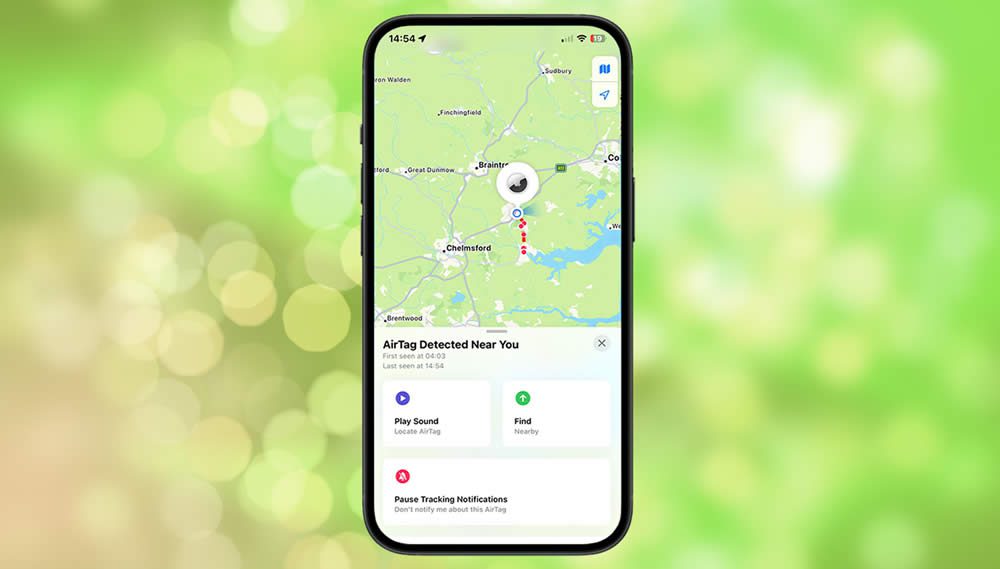
So what do you do if you see this message on your Apple iPhone?
This guide has been based on Apple’s own instructions which can be found here on the Apple Website
Disabling an unknown AirTag
If you find an unknown AirTag potentially used for unwanted tracking, follow these steps to disable it:
- Get the AirTag: If you find an unknown AirTag near you, the first step is to physically locate it. People can hide AirTags in a bag, coat, or other personal belongings due to their small size.
- Check the AirTag: If the AirTag is moving with you, you should receive a notification on your iPhone. Tap the notification to view more details about the AirTag and its location.
- Disable the AirTag:
- Remove the battery: Open the back of the AirTag by twisting the stainless steel cover. Once removed, take out the battery. This will immediately disable the AirTag.
- Contact Authorities if Necessary: If you suspect someone is using the AirTag for malicious tracking, contact local law enforcement for further assistance.
- Notify Apple: You can report the issue to Apple if you believe someone is misusing the AirTag for tracking purposes.
By removing the battery, you effectively turn off the AirTag, preventing it from sending out location updates.
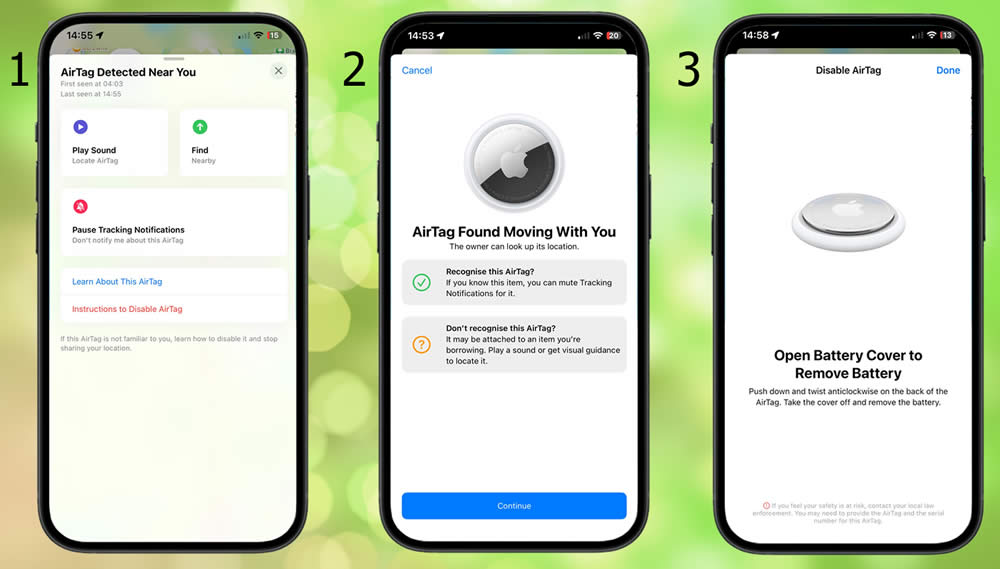
The three Apple iPhone messages above clearly show what will appear on your iPhone if a rogue Apple AirTag is tracking you.
- AirTag Detected Near You
Apple has made it super easy for people to locate an Apple AirTag. Well, that’s kind of the point of them, to locate missing items – no? We recommend pressing the “Play Sound” button and listening for the AirTag, if you can not hear the beeping noise use the “Find” option and your iPhone will guide you to the location, then when closer to the AirTag use the “Play Sound” option again to find the device. Once found remove the battery to disable the device, see the instructions below. - AirTag Found Moving With You: Two options you can select.
- You can click the ‘Recognise this AirTag‘ button, and you won’t receive any further notifications from this AirTag.
- If this is a potentially rogue tracker, click the ‘Don’t recognise this AirTag?‘ button, and you’ll receive guidance on how to disable the Apple AirTag.
- Disable AirTag.
It is very easy to disable an Apple AirTag, just simply follow the below instructions to remove the battery.
Removing the battery from an Apple AirTag
To remove the battery from an Apple AirTag, follow these steps:
- Hold the AirTag: Place the AirTag with the silver side facing up.
- Twist the Cover: Press down on the stainless steel cover and rotate it counterclockwise. It turns easily until you reach a point where you can remove it.
- Remove the Cover: Twist off the cover and lift it to expose the battery inside.
- Take Out the Battery: Gently remove the CR2032 coin cell battery from the AirTag. This will immediately disable the AirTag and stop it from sending location signals.
- Reassemble: If you need to put it back together, simply place the battery back in the AirTag and align the cover. Twist it clockwise until it clicks into place.
Removing the battery disables the AirTag and stops it from tracking its location.
Conclusion: Why Apple AirTags are not recommended as a GPS Surveillance Tracking Device
An Apple AirTag is not suitable for GPS surveillance tracking for several reasons:
- No GPS functionality: AirTags do not have built-in GPS. Instead, they rely on Bluetooth to connect to nearby Apple devices within the Find My network to update their location. This means they can only track when they’re within range of an Apple device (like an iPhone, iPad, or Mac) connected to the Find My network
- Limited range: AirTags rely on Bluetooth, which limits their tracking range to about 100 metres (328 feet) in ideal conditions. Once they move out of range of a connected Apple device, they can no longer send location updates directly. They will only update their location if another device from the Find My network passes nearby.
- Lack of real-time tracking: Unlike dedicated GPS tracking devices, AirTags do not provide continuous, real-time tracking. They can only update their location intermittently when they come into range of a device in the Find My network. This makes them less reliable for continuous surveillance or tracking.
- Privacy and security measures: Apple has built multiple privacy features to prevent unwanted tracking. This includes sending alerts to iPhone users when an unknown AirTag moves with them over time. If someone uses an AirTag for unwanted surveillance, your iPhone will notify you. You can then take steps to disable the device.
- No data connection: AirTags don’t have cellular connectivity or Wi-Fi capabilities. They cannot send or receive location data independently of nearby Apple devices. Unlike GPS trackers that often have built-in cellular or satellite connections for more reliable, independent tracking.
- Apple’s anti-stalking features: Apple has designed AirTags with anti-stalking measures. These come as notifications if an AirTag is travelling with you without your consent. This directly prevents people from using AirTags for illegal surveillance or tracking purposes. Disabling an Apple AirTag is a very easy process.
For effective, continuous GPS surveillance tracking, dedicated GPS devices with built-in satellite or cellular connectivity are a far more reliable option than AirTags.